New
Live Coaching

Reps coached in real time, during their calls

During calls and meetings, Praiz detects objections and competitor mentions, and shows your reps the planned answer from your playbook. Your whole team follows your method, new hires included.


Trusted by 500+ teams

AI detects customer objections during the call

Praiz follows the conversation live. As soon as the prospect raises an objection, your rep sees what to say, without improvising or searching through documents while the prospect waits.

✓
An objection comes up: the answer from your playbook
✓
A competitor is mentioned: its battlecard
✓
A discovery step is skipped: a reminder
Praiz Live Coaching suggestions: price objection answer and competitor battlecard

Your playbook, not generic tips

The playbook you built lives in Praiz: sales method, pitch, objections and answers, battlecards by competitor, meeting frameworks. Your reps apply it during the call, instead of leaving it in a shared folder.

✓
You write it, import it (a PDF is enough) or generate it from your team's calls
✓
It can regenerate every week, with version history
✓
The Praiz team sets it up with you
Sales playbook in Praiz: sales method, objections, battlecards and frameworks

The right questions asked, in every meeting

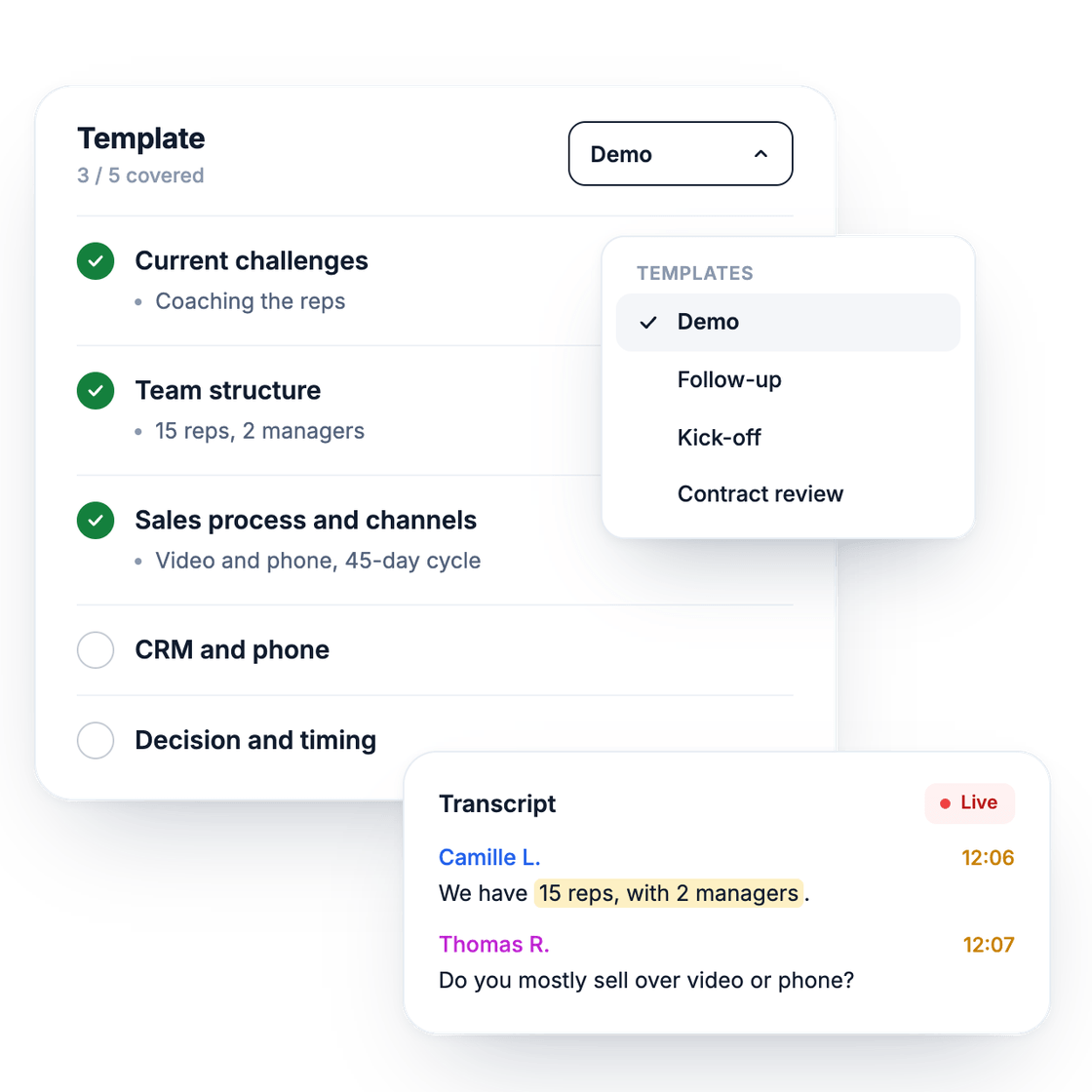
You define the framework for your meetings: demo, follow-up, kick-off. During the conversation, your reps see the points already covered and those left: nothing gets missed. After the call, you know whether they followed your method and asked the right questions.
✓
Several frameworks, one per meeting type
✓
Live transcription in the panel
✓
The prospect's answers sent to your CRM
Discover CRM auto-fill →
Meeting framework ticked off live during a sales call in Praiz

A question in the middle of a call? Your reps ask the AI

From the panel, they ask the AI about the ongoing conversation, without leaving it and without waiting for a check-in with their manager. They type their question or pick a ready-made one.

“Summarize what was just said”
“What objections so far?”
“What question should I ask now?”
“How do I answer what they just said?”
Asking Praiz AI during a call: the objections raised so far

On video or on the phone, your reps stay in control

Live Coaching works with all your video calls, and with Aircall and Ringover. Suggestions only show on the rep's side: your prospect does not see them. Praiz suggests, your reps decide. The relationship with the prospect stays their job.

Zoom

Google Meet

Microsoft Teams

Aircall

Ringover

How do you help your reps during their calls and meetings?

01

Before the conversation

Your reps prepare their meetings with your playbook.

02

During the conversation

Live Coaching assists them, based on the same playbook.

03

After the conversation

A scoring agent evaluates the conversation against that playbook, and you know what to coach each rep on.

Onboarding

You're not left alone with the AI

01
Your playbook and goals as the starting point
02
Agents configured and checked with you
03
New agents when your priorities change
FAQ

Frequently asked questions

Does the prospect see the suggestions?
+
No. Suggestions only show in the Praiz desktop app, on the rep's computer. They do not appear in the video call. If the rep shares their whole screen, they turn on the app's option that hides the Praiz window from screen sharing.
How does Praiz detect objections during a call?
+
Praiz transcribes the conversation live and compares it with your company's playbook. When the prospect raises a planned objection, the answer appears on the rep's screen. After the call, call analysis surfaces the most frequent objections across all your conversations.
How do I know if my reps follow the playbook?
+
After the call, a scoring agent evaluates the conversation against the same playbook. You see, rep by rep, what was applied well and what needs work, in a report sent by email or in Slack. Details are on the sales coaching page.
Do we need a written playbook first?
+
No. You start from what you already have: a PDF, your battlecards, your objection handling. You can also generate the playbook from your recorded calls. The Praiz team then sets it up with you.
Does Live Coaching work with Aircall and Ringover?
+
Yes. The rep places the Praiz window next to their Aircall or Ringover dialer, or next to their video call: Google Meet, Teams, Zoom or any other. The only thing to install is the Praiz desktop app, on Mac or Windows.
Does Live Coaching work in English?
+
Yes. Live Coaching works in English and French, on your calls and meetings: from live transcription to the suggestions shown to your reps.
How much does Live Coaching cost?
+
Live Coaching is part of the Coaching and Sales Enablement add-on, together with the playbook, on top of the Praiz license. The add-on costs €20 per user per month (excl. VAT) billed annually upfront, €30 otherwise. It is in early access: book a demo to join.
Is my conversation data protected?
+
Yes. Your recordings are stored in France and are never used to train AI models. Praiz is ISO 27001 certified and GDPR compliant. Details are on our Trust Center.

Bring your playbook into your team's calls

Live Coaching is in early access. Book a demo to see it on your own conversations.